Getting help with App Connect
Need help connecting to your CRM?
If App Connect doesn't yet support your CRM, an App Connect partner can build the connection for you.
Get help using App Connect
Knowledge base
-
A breakdown of what's free and what costs extra when using App Connect.
-
How long will the introductory period last?
Find out how long the free introductory period for AI-generated call artifacts will last.
-
App Connect opens but there is no button to authorize or connect your CRM.
-
Contact not found during call lookup
A caller's contact exists in your CRM but App Connect cannot find them.
-
Calls stuck in "Pending" or "preparing data..."
Call log records are created in the CRM but never fully populated — they stay in a Pending state indefinitely.
-
"Could not load user information" (GoHighLevel)
GoHighLevel authorization completes but App Connect can't load your user information.
Does App Connect support contact synchronization?
Not natively. App Connect's core framework does not write CRM data into RingCentral — but a free plugin adds limited, one-way contact synchronization on top of it.
Contact lookup versus contact synchronization
These are two different things, and most requests for "contact sync" are actually asking about the first one:
- Contact lookup — supported. This is what App Connect does by default: a real-time, read-only search. When a call arrives, App Connect searches your CRM for a matching phone number and displays that contact's information within the App Connect sidebar. Nothing is written anywhere — your CRM remains the only place that record lives.
- Contact synchronization — not supported. This means copying contact data from your CRM into RingCentral itself, typically so callers are identified by name in the RingCentral Personal Address Book — on a desk phone, the mobile app, or a softphone, not just inside App Connect. App Connect's core framework does not do this natively; the limited exception provided by a plugin is covered below.
Native contact lookup (built in, no setup required)
Out of the box, App Connect only performs contact lookup, and only within the App Connect client itself. A caller who is correctly identified in the App Connect sidebar during a call will still show up as an anonymous number on your desk phone or the RingCentral mobile app, because no data has been written back to RingCentral.
Limited contact synchronization via the Lazy Contact Sync plugin
For customers who want callers identified by name across every RingCentral device — not just inside the App Connect client — Captivo Labs publishes a free plugin, Lazy Contact Sync, that adds this capability on top of App Connect.
Lazy Contact Sync is deliberately limited in scope, and it's worth understanding those limits before you install it:
- One direction only. It syncs from your CRM into the RingCentral Personal Address Book. It never writes back to your CRM.
- Lazy, call-triggered sync. There is no bulk import and no sync schedule. A contact is only created or updated in RingCentral the moment they call in (or are called) through App Connect.
- Grows from real activity only. Your RingCentral address book accumulates the people you've actually corresponded with, not your entire CRM contact base.
See Lazy Contact Sync for details on how it works and how to install it, and Plugins for how to browse and manage App Connect plugins generally.
If you need full, two-way contact synchronization
There is currently no native feature or plugin that performs bulk, two-way synchronization of your entire CRM contact list with RingCentral. If you need a contact to appear in RingCentral's directory regardless of call history, they must be added to RingCentral manually or via a CSV import.
Managing software updates
Updates to App Connect are installed automatically by Chrome and Edge when you restart your browser. To check which version is currently installed, navigate to Manage extensions in your browser, find App Connect in the list, and click Show details. The currently installed version is displayed there.
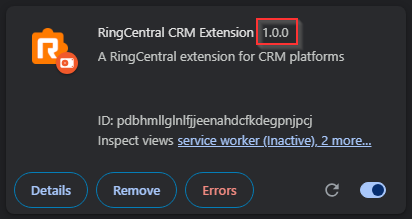
To ensure you are running the most recent version, restart your browser. In rare cases where a restart does not resolve an issue, uninstalling and reinstalling the extension is worth trying as a last resort.