Call-back Lists
Call-back lists help you manage and execute outbound calling campaigns efficiently. This feature provides a centralized place to organize your contacts, make sequential calls, and track your calling progress—all designed to help you meet your outbound call quotas.
What are Call-back Lists?
Call-back lists are personal contact lists that streamline your outbound calling workflow. Instead of manually searching for and dialing each contact, you can:
- Create organized lists of contacts you need to call
- Schedule callbacks for future engagement
- Track your progress toward daily call goals
Accessing Call-back Lists
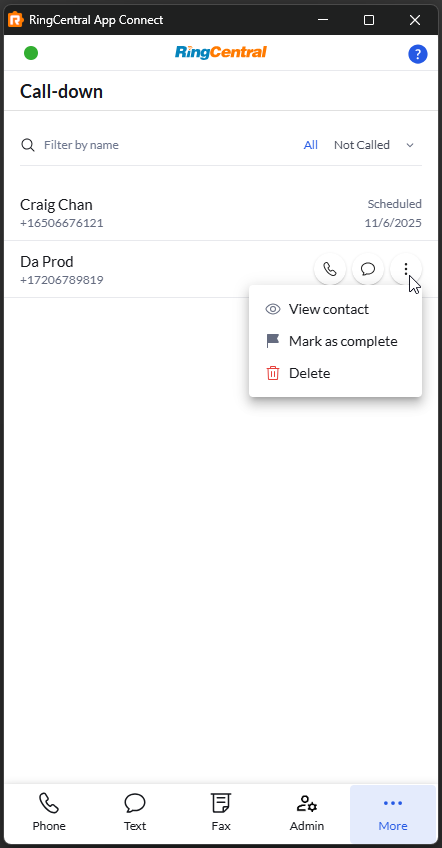
Find your call-back lists in the Call-back tab within App Connect.
Adding Contacts to Your List
You can add contacts to your call-back list in several ways:
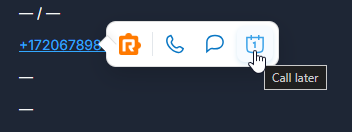
From Click-to-Dial
Hover on contact number and use click-to-dial to schedule it.
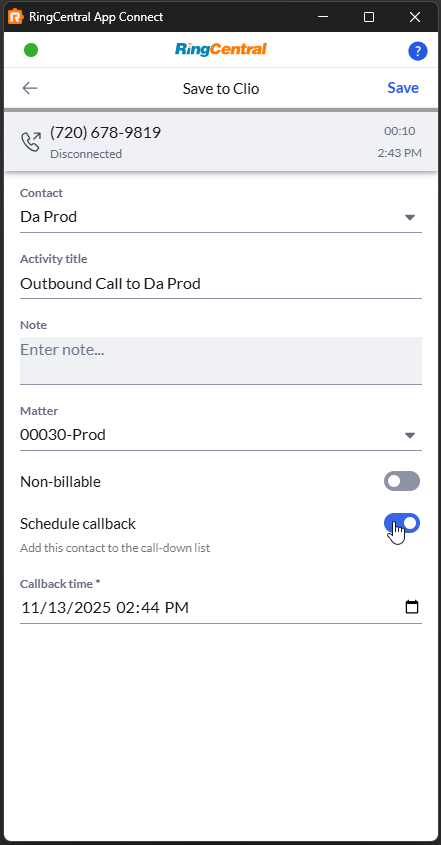
During Call Logging
After completing a call, you can schedule a callback by selecting the option to call this contact at a later time. This automatically adds them to your call-back list.
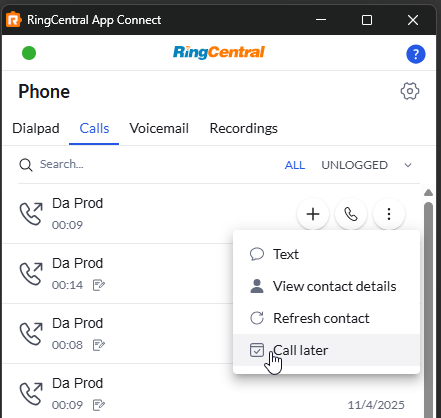
From Call History
- Navigate to your call history
- Find the contact you want to call back
- Select Call later
- Choose when you want to call them
Managing Your Call-back List
View and Filter Contacts
Filter by name: Use the search box to find specific contacts
Filter by status: Show only Called, Not Called or Scheduled contacts
View scheduled calls: See how many calls are scheduled for today using the counter badge on top of tab icon